Manipulating Objects
The Big Idea
You will work with a JavaScript object and manipulate it step by step — adding properties, changing values, deleting properties, and nesting objects — without modifying the original object literal directly.
Your Roadmap
| Section | Time | Required? |
|---|---|---|
| Setup | 5 min | ⚑ Required |
| Object anatomy recap | 5 min | ⚑ Required |
| Pass the tests | 1.5 hrs | ⚑ Required |
Setup
Run the tests for this kata:
npm test 2-manipulate-objects
Object anatomy recap
Here is the object you will be working with:
const terah = {name: 'Terah',age: 32,height: 172,hairColor: 'brown',eyeColor: 'brown',}
You must complete each task outside the curly braces — do not modify the object itself.
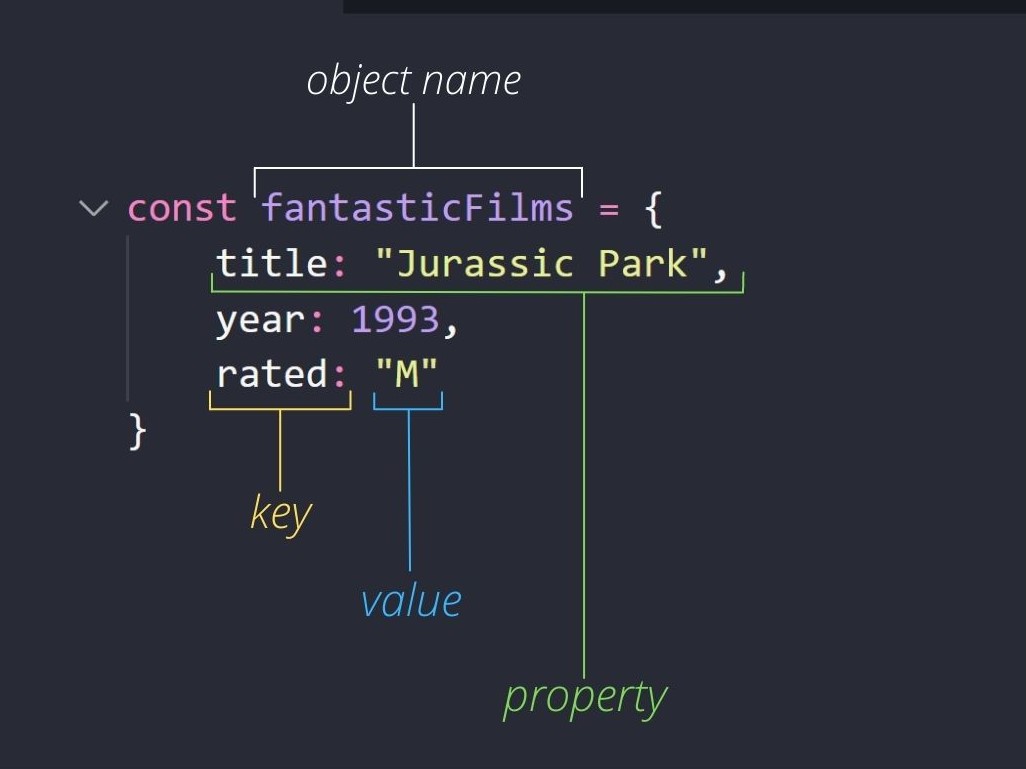
Here is the terminology used in this kata — a quick recap of an object's anatomy:
Pass the tests
Each step below matches one test. Complete them in order. After each step, run the tests to confirm it passes before moving on.
Note: Each step is its own line of code, and each builds on the code before it.
Define a variable
adamand use object literal notation to assign this variable the value of an object with no properties.Give the
adamobject anamekey that has the value"Adam".Add a
spousekey toterahand assign it the value ofadam.Change the value of the
terahage property to33.Remove the
eyeColorproperty fromterah(hint: use thedeleteoperator).Add a
spousekey to theadamobject and assign it the value ofterah.Add a
childrenkey toterahand use object literal notation to assign this variable to an empty object.Add a
benproperty to the value of theterahchildren property.benshould be an object with the keynameand the value"Ben".Add a
wilsonproperty to the value of theterahchildren property.wilsonshould be an object with the keynamewith the value"Wilson".Add a
feliciaproperty to the value of theterahchildren property.feliciashould be an object with the keynamewith the value"Felicia".Add a
childrenproperty toadamand assign it the value ofterah.children.
Your final terah object will be logged to the console when all the tests have passed.