Set Up Your Blog Structure
The Big Idea
Your blog repo is cloned — now you will set up the folder structure and create your first HTML file. This structure is the foundation everything else builds on. By the end you will have a blog-posts directory, a te houtaewa template, and a linked CSS file ready to go.
Your Roadmap
| Section | Time | Required? |
|---|---|---|
| Add your blog-posts folder | 10 min | ⚑ Required |
| Add CSS | 10 min | ⚑ Required |
| Link HTML and CSS | 10 min | ⚑ Required |
| Link it from your index page | 5 min | ⚑ Required |
| Commit and push | 5 min | ⚑ Required |
| Check your structure | 5 min | ⚑ Required |
Add blog-posts
Each sprint you will write a blog post as an HTML file inside the blog-posts folder. This step creates that folder and adds your first template.
In your terminal, navigate into your blog repo and run:
mkdir blog-postscd blog-poststouch te-houtaewa-template.htmlcode .
Open te-houtaewa-template.html in VS Code. Go to your cohort's resources repo: resources — select your cohort in the top-right corner of this page to see the link, then open sprint1-technical.html. Copy and paste the template contents into your file. Save the file — Cmd+S on Mac, Ctrl+S on Windows/Linux.
Blog posts follow the naming convention topic-name.html — for example identity-values.html or javascript-basics.html.
To view the file in your browser, run npx vite from your blog directory and visit:
http://localhost:5173/blog-posts/te-houtaewa-template.html
Add CSS
Now create a styles directory and a main.css file. This is a standard naming convention — almost all websites have a file named main.css.
Navigate back to your blog root, then run:
cd ..mkdir stylescd stylestouch main.css
Link HTML and CSS
Each HTML file needs to be explicitly linked to your CSS file. Open te-houtaewa-template.html and replace the placeholder link in the <head>:
<!-- Old --><link href="your-stylesheet-link-here.css" rel="stylesheet" type="text/css" /><!-- New --><link href="../styles/main.css" rel="stylesheet" type="text/css" />
Save the file.
If stuck, this video demos linking CSS to HTML at 5:08.
Link it from your index page
Open your index.html and add a link to te-houtaewa-template.html so visitors (and you) can find it from your blog's homepage.
Inside the <body>, add something like:
<a href="blog-posts/te-houtaewa-template.html">Te Houtaewa</a>
You will do this for every blog post you create — each new post gets a link added to your index page.
Commit and push
git add -Agit commit -m "Set up blog structure and add te houtaewa template"git push
Check your structure
Go to your blog repo on GitHub and confirm it matches this structure:
Figure 1: Expected blog file and folder structure
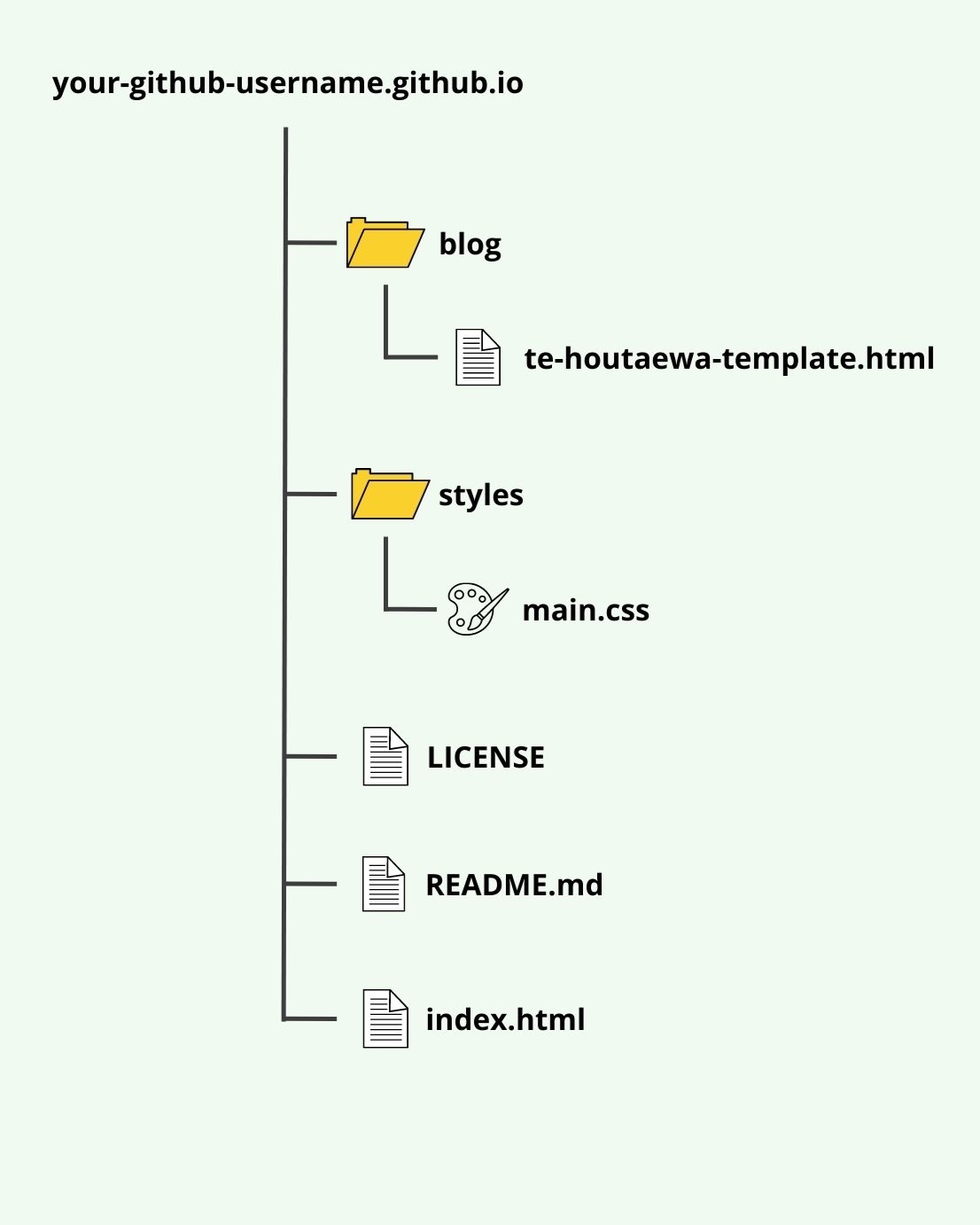
If it doesn't match, fix it before moving on.
How to know you've nailed it
| Level | You can... | ||
|---|---|---|---|
| 🪨 | Intro Climb | Create the blog-posts folder and te houtaewa file | ⚑ Required |
| 🧗 | Core Ascent | Link main.css to the HTML file and confirm the structure on GitHub | ⚑ Required |
| 🏔️ | Summit | Explain why each folder exists and what the CSS link in the head does | ◎ Optional |
The Big Idea (revisited)
Every blog post you write from here on lives in blog-posts/. Every page links to styles/main.css. You have set that up once — now the structure is ready for everything that follows.